Device code phishing against Microsoft 365
By Elias Lankinen12 min read
All images verified. I have enough from primary sources (Microsoft, Volexity, RFC 8628, Microsoft Learn, Huntress/Unit 42 reporting). Writing the post now.
A six-digit code, and a ministry loses control of its email
In January 2025, an official received a message on Signal from someone claiming to work for the Ukrainian Ministry of Defence. The conversation was friendly and plausible, and after a while it moved to Element, another encrypted chat app, on the pretext of a more secure line. Then came the ask: to join a secure chat room, please open a Microsoft page and type in this short code. The official did. The code worked. Nothing looked wrong, because nothing was wrong, from the victim's point of view. They had signed in to the real Microsoft, passed multi-factor authentication, and seen a normal success screen. What they did not see was that on the other side of the world, an attacker's software had just been handed a valid set of tokens to their Microsoft 365 account. That account stayed compromised even after the password was changed. That episode, documented by the security firm Volexity and, on the same day, by Microsoft Threat Intelligence, is a textbook case of device code phishing: a technique that turns one of Microsoft's own legitimate sign-in features into an account-takeover tool. It has since become one of the most reliable ways for state-linked and criminal hackers to walk past the very defenses, multi-factor authentication chief among them, that most organizations installed precisely to keep them out.
A flow built for smart TVs
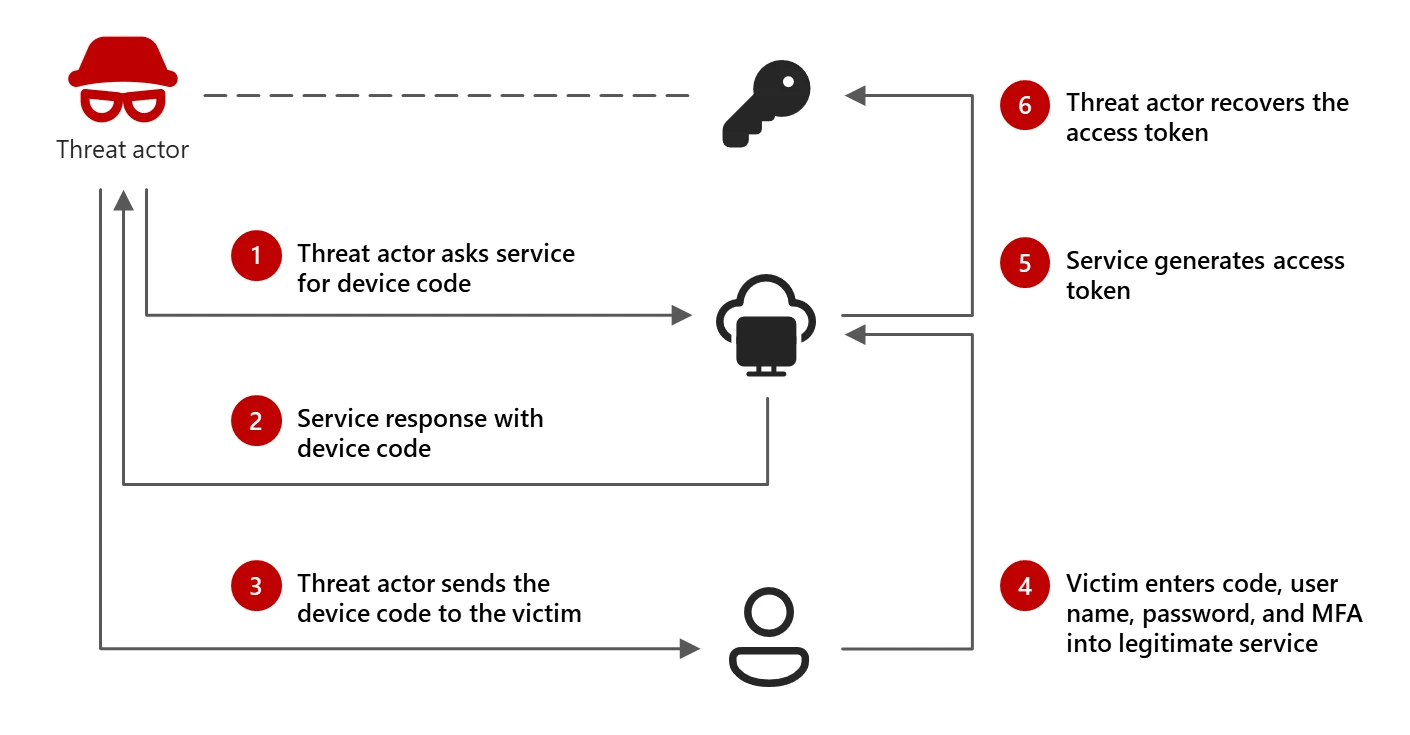
To understand the attack you first have to understand the feature it abuses, and why that feature exists at all. When you sign in to Netflix on a smart TV, you have probably noticed that you do not type your password with the remote control. Instead the TV shows a short code and a web address, and tells you to visit that address on your phone and enter the code. A moment after you approve it on the phone, the TV logs itself in. That pattern is a formal internet standard: the OAuth 2.0 Device Authorization Grant, published as RFC 8628 in August 2019. OAuth, short for Open Authorization, is the framework that lets one app get access to your account on another service without handling your password directly. The device grant is the branch of it designed for gadgets with no keyboard or no browser: TVs, media consoles, printers, IoT hardware. The design is elegant. A device that cannot comfortably show a login page offloads the hard part, entering credentials and passing MFA, to a second device that can. In OAuth's own terms, one client starts the flow, and a human finishes it somewhere else. Here is the sequence, stripped down:
- The device asks the authorization server for a code. The server returns a device code (for the machine) and a shorter user code (for the human), plus a verification URL.
- The device shows the user code and URL, then starts quietly polling the server: is it approved yet? is it approved yet?
- The human goes to the URL on a phone or laptop, signs in normally, and types the user code.
- Once the human approves, the server hands the polling device its access token, and the device is logged in. The whole thing is time-boxed. In Microsoft's implementation the user code is valid for roughly 15 minutes, as Volexity noted, after which it expires and the attacker has to start over.
The flaw is a feature: nobody checks who is holding the code
Here is the crux, and it is worth stating plainly because it is the whole game. The device code flow assumes that the machine displaying the code and the person entering the code are the same party, sitting in the same room. But nothing in the protocol enforces that. The user code is just a string. Whoever types it into the real Microsoft page approves whatever client requested it, wherever that client happens to be running.
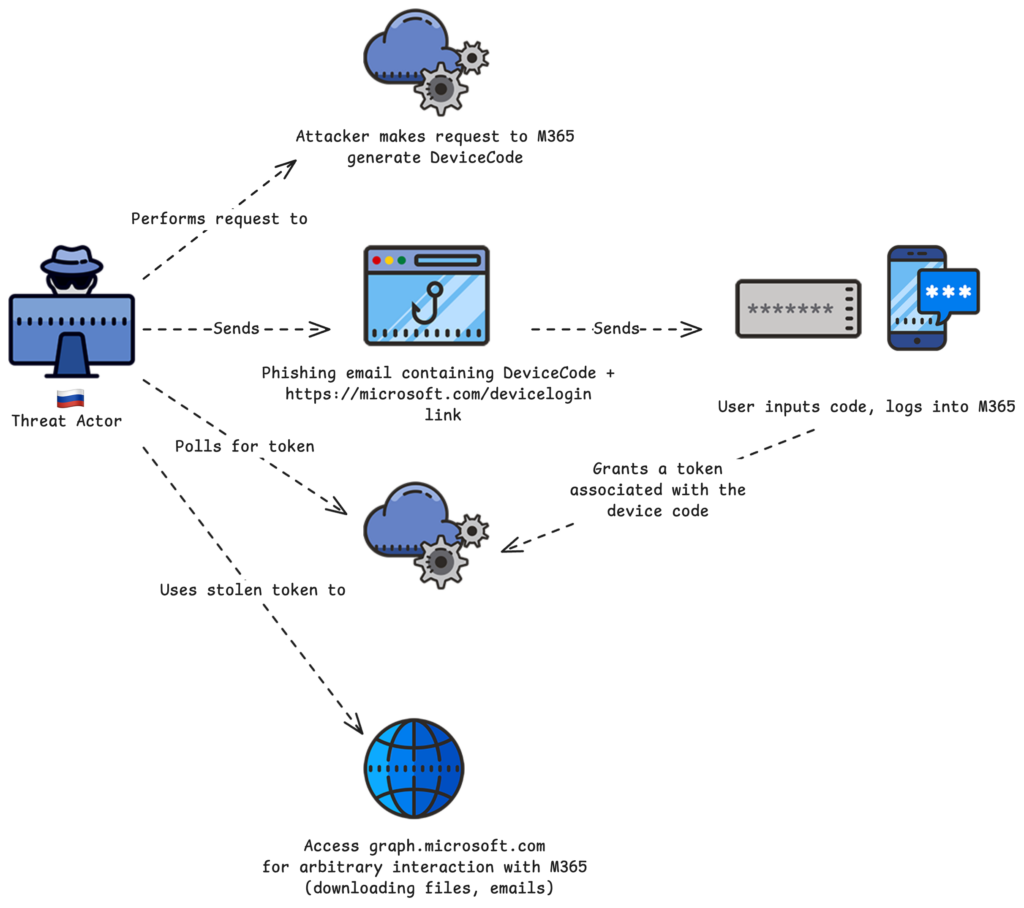
So an attacker does not need to build a fake login page, register a lookalike domain, or steal a password. They start a genuine device code flow against Microsoft, receive a genuine user code, and then simply persuade a victim to enter that code on the genuine microsoft.com/devicelogin page. The victim authenticates for real. Microsoft, seeing a valid sign-in with valid MFA, issues tokens to the client that requested the code, which is the attacker's software polling in the background. As the security firm TrustedSec put it, "the victim ends up granting access to the attacker by completing a genuine sign-in on a Microsoft URL."
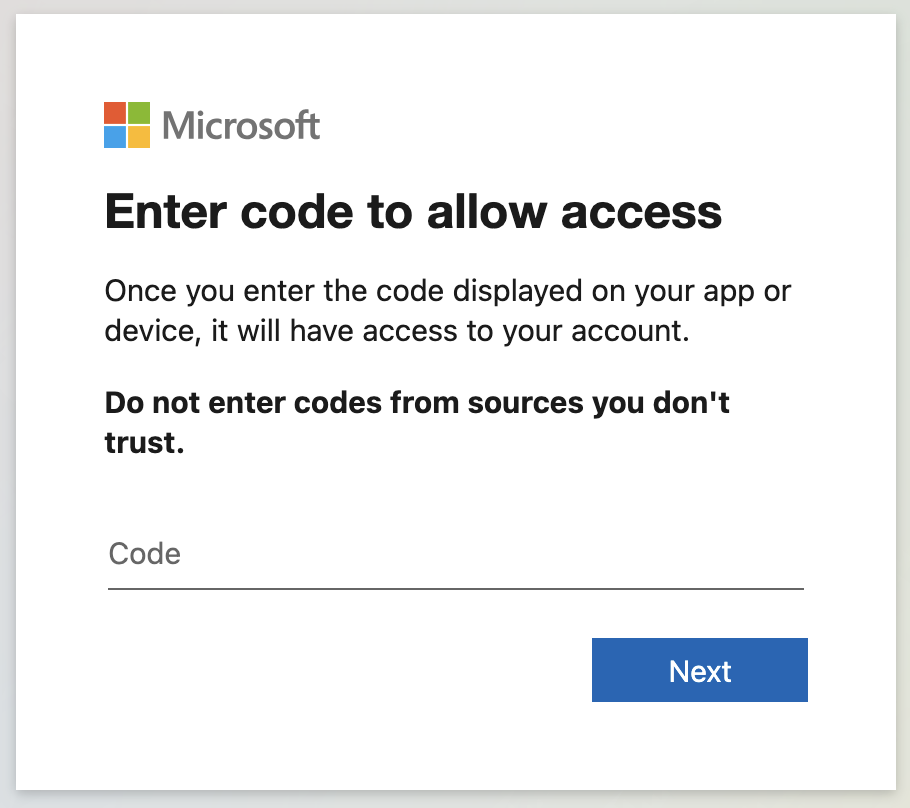
There is a second subtlety that makes it worse. When the attacker requests the code, they get to choose which application is asking for access. In practice they request one of Microsoft's own trusted first-party apps. TrustedSec's walkthrough uses the Office client, identified internally by the ID d3590ed6-52b3-4102-aeff-aad2292ab01c. Because the request appears to come from a legitimate Microsoft application hitting a legitimate Microsoft endpoint, it often sails past Conditional Access rules, the policies administrators use to restrict who can sign in from where. As far as the sign-in pipeline is concerned, this is Microsoft talking to Microsoft.
The con: patience, a false identity, and a 15-minute window
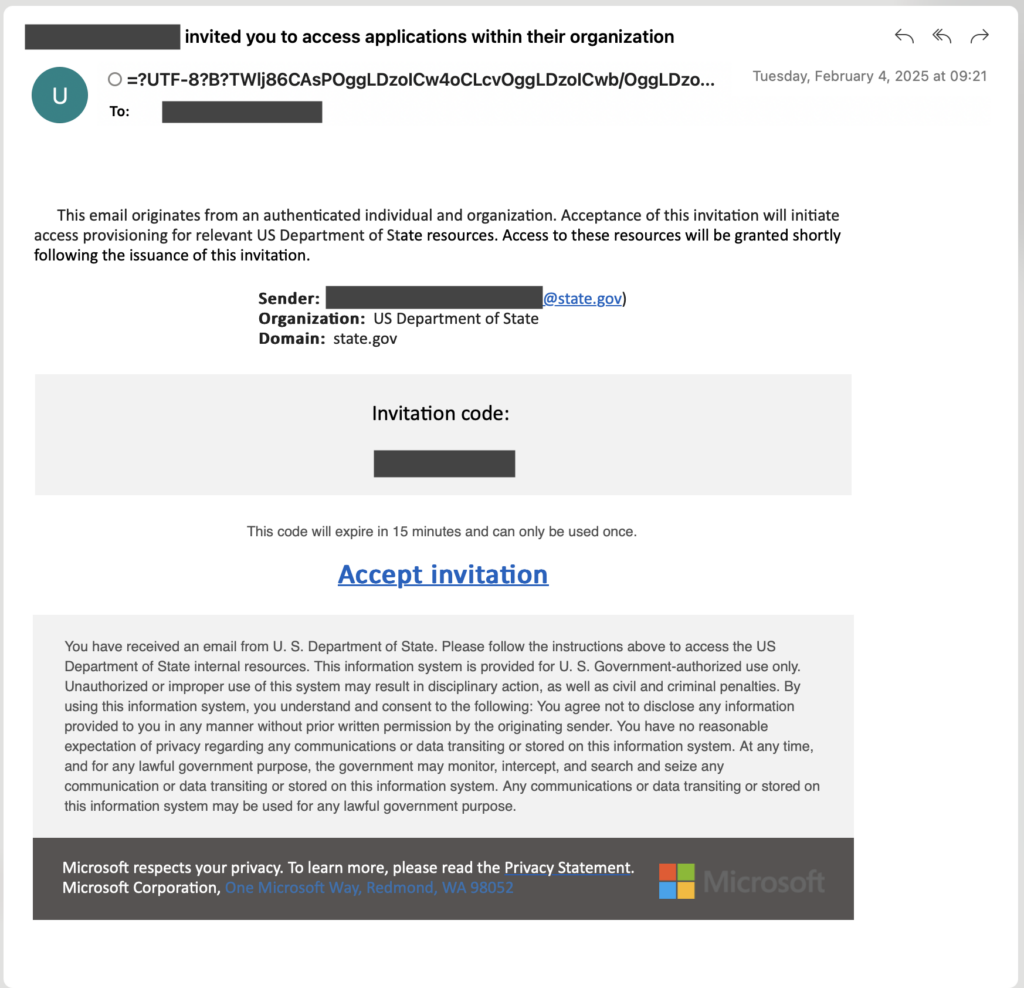
Everything above is just plumbing. The reason device code phishing works in the wild is the social engineering wrapped around it, and the crews running it are good at that part. Microsoft tracks the most prominent operator as Storm-2372, a cluster it assesses "with medium confidence" to be aligned with Russian state interests, active since at least August 2024. Its targets read like an intelligence collection plan: government, NGOs, defense, telecoms, IT and technology, health, higher education, and energy across Europe, North America, Africa, and the Middle East. The lures often imitate the look of Microsoft Teams meeting invitations, and the operators sometimes pose as well-known people on WhatsApp or Signal to build rapport before the trap is sprung. Volexity, investigating the same period, split the activity into three distinct groups: CozyLarch, which it links to the notorious APT29 (also called Midnight Blizzard or Cozy Bear, and blamed for the SolarWinds intrusion), plus two it named UTA0304 and UTA0307. Each ran the con differently:
- UTA0304 did the Signal-to-Element handoff described at the top of this piece, impersonating the Ukrainian Ministry of Defence. Crucially, an operator stayed on the line in real time, coordinating so the victim would click the phishing link and enter the code inside the 15-minute validity window.
- UTA0307 opened with harmless emails about geopolitics (the Trump administration, China-EU relations) to establish a rapport, then followed up with a fake Teams meeting invitation carrying the code.
- CozyLarch went for volume instead of finesse, blasting phishing from Gmail accounts while impersonating the U.S. Department of State, the EU Parliament, and research institutions. That timing pressure is the operational heart of the attack. The code expires fast, so the best crews do not send a code and hope; they get the victim on a live channel and hand-hold them through it. Attackers have since engineered the deadline away entirely. UTA0307 used a landing page that generated a fresh device code on every visit, according to Volexity, so the code was never stale when the victim arrived.
Why multi-factor authentication does not save you
This is the point most people get wrong, so it deserves to be met head on. The common belief is that turning on MFA stops phishing. For classic credential phishing, the kind where a fake page harvests your password, that is largely true: a stolen password alone is useless without the second factor. Organizations spent years and considerable money on that lesson. Device code phishing sidesteps it completely, and not by defeating MFA but by using it. The victim performs the real second-factor step, on the real Microsoft page, as part of a legitimate sign-in. The MFA challenge succeeds because it is supposed to succeed. Only afterward does Entra ID, Microsoft's identity service, mint the tokens and deliver them to the attacker's waiting client. As TrustedSec observes, "device code phishing satisfies an MFA claim during the legitimate sign-in, so stronger MFA does not by itself stop it." The attacker never sees the password or the one-time code, and never needs to. There is an important nuance about phishing-resistant MFA, the strongest tier, which uses hardware security keys or passkeys built on the FIDO2 standard and cryptographically ties the login to the real site. That binding is what defeats fake-page phishing. But in a device code attack there is no fake page to detect: the victim really is on Microsoft's site. The FIDO2 sign-in works perfectly and the flow still completes. Phishing-resistant MFA raises the bar, and is absolutely still worth deploying, but the honest framing is that this attack targets the authorization step that happens after authentication, which is a different link in the chain. The tokens are the prize, and the tokens get issued no matter how strong the login was. That is also why the compromise is so durable. Because the attacker holds a refresh token, a credential that can be exchanged for fresh access tokens, resetting the victim's password does not evict them. Volexity specifically warned that access "can persist even after password resets." You have to revoke the tokens themselves, which most victims never think to do.
From a foothold to the master key
If it stopped at reading one mailbox, device code phishing would be serious enough. It does not stop there. Within about 24 hours of its campaign going public, Storm-2372 changed tactics in a way that raised the ceiling on damage. Instead of requesting the Office app, it began requesting the Microsoft Authentication Broker client, Microsoft reported. That app can register a device into Entra ID. With the refresh token in hand, the attacker registers a device they control, and then uses that new device identity to obtain a Primary Refresh Token, or PRT. The PRT is the credential to worry about. It is what Entra issues to a properly registered, trusted device, and it powers seamless single sign-on across the whole Microsoft 365 estate: mail, SharePoint, OneDrive, Teams, and more, without prompting again. An attacker with a PRT is no longer a phisher with a stolen session; they are, in the identity system's eyes, a trusted enrolled device belonging to the organization. From there, Microsoft observed operators using the Graph API, the programmatic interface to Microsoft 365 data, to sweep mailboxes for messages containing words like password, admin, credentials, secret, ministry, and gov, then exfiltrate what they found and move laterally to other accounts.
From artisanal to industrial
For most of 2025 this was a boutique technique: careful, hand-driven operations by state-linked crews against high-value targets. That has changed. In February 2026 the security firm Huntress spotted a campaign that had industrialized the whole thing. It hit more than 340 Microsoft 365 organizations across the United States, Canada, Australia, New Zealand, and Germany, with the first cases seen around 18 to 19 February 2026 and Palo Alto Networks Unit 42 and Sekoia publishing corroborating analyses. The victimology had broadened well past espionage targets, into construction, real estate, manufacturing, financial services, healthcare, legal, and nonprofits, the profile of financially motivated crime rather than intelligence work. What made the scale possible was a phishing-as-a-service platform called EvilTokens, which surfaced in mid-February 2026. Phishing-as-a-service means the hard engineering is packaged and rented out, so a low-skill buyer can run a sophisticated campaign. The lures diversified accordingly: construction bid requests, DocuSign impersonations, voicemail notifications, even abuse of Microsoft Forms. The backend hid behind Cloudflare Workers redirects and Railway.com hosting, and, tellingly, behind the legitimate redirect services of security vendors like Cisco, Trend Micro, and Mimecast, using the good guys' own link-rewriting to look clean. Then it got smarter. In April 2026, Microsoft described an AI-enabled version of the campaign in which generative AI wrote phishing emails tailored to each victim's role, referencing the RFPs, invoices, and workflows a given recipient would plausibly expect. The infrastructure was automated end to end: thousands of short-lived polling nodes, codes generated on demand to beat the expiry window, polling every few seconds, and in some cases device registration completed within ten minutes of compromise. What began as patient one-to-one social engineering had become a machine.
What actually stops it
The uncomfortable truth is that the usual advice, "turn on MFA, train users to spot fake login pages," misses this attack, because the page is real and the MFA is real. The controls that work are different in kind. The single most effective one is to block the device code flow outright for anyone who does not need it. Microsoft's Conditional Access now includes an authentication flows condition specifically for this, and the guidance in Microsoft's own documentation is blunt: get as close as possible to a unilateral block, allowing device code sign-in only where genuinely required, such as a defined set of shared kiosk or signage devices in a known location. Very few organizations actually use the device code flow for normal work, which means most can turn it off with little disruption and close the door completely.
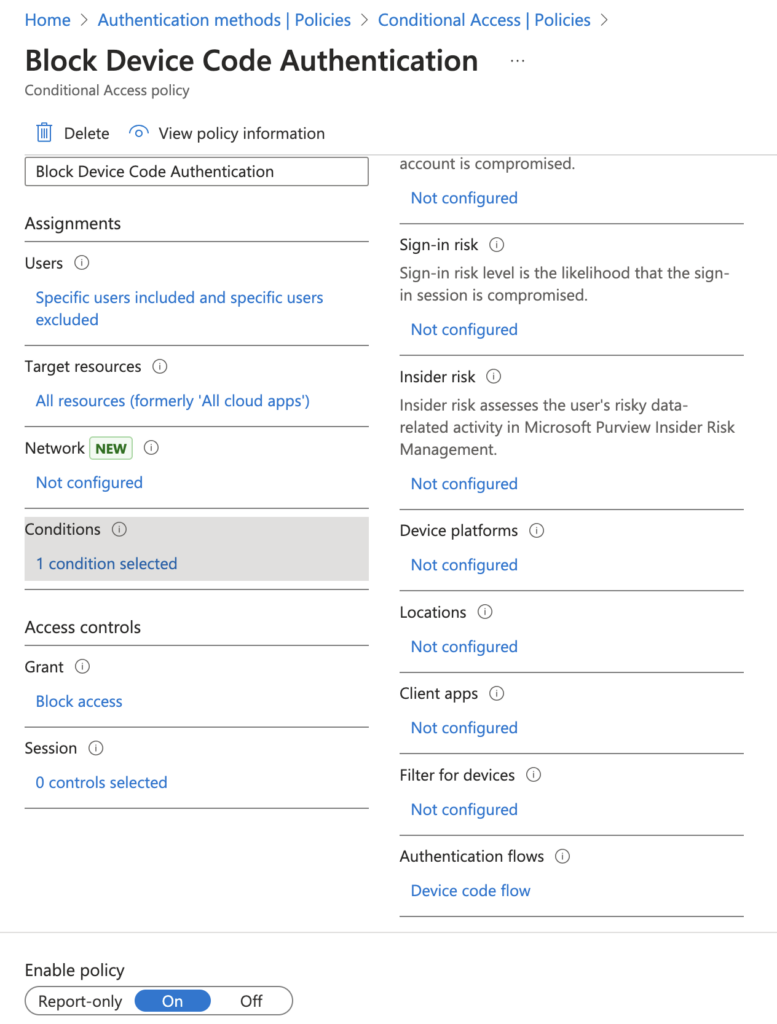
Beyond the block, defenders lean on detection and containment. Entra ID sign-in logs flag this flow explicitly, with fields like authenticationProtocol set to deviceCode, so security teams can hunt for device code sign-ins that they never expected to see, especially when followed by new inbox rules or a fresh device registration. When an account is caught, changing the password is not enough; responders have to revoke the refresh tokens (the Revoke-MgUserSignInSession command, or revokeSignInSessions in Graph), remove any malicious inbox rules the attacker planted, and check for rogue registered devices. And because the con depends on live coordination, the most durable user-facing defense is a simple cultural rule: nobody should ever type a login code they received from someone else, through any channel, for any reason.
What to watch
Device code phishing is a specific instance of a larger shift, and that shift is the real story. Attackers have stopped trying to steal passwords and started stealing authorization itself: the tokens, sessions, and trusted-device identities that sit downstream of the login every organization worked so hard to harden. MFA, even the phishing-resistant kind, secures the front door. This class of attack walks around to a side door the standard advice never mentioned, and that side door was, by design, held open for the printer. The trajectory over the past year and a half, from careful Russian espionage in early 2025 to a rented, AI-driven crime service by early 2026, suggests the technique is nowhere near exhausted. The open question is how much of our security thinking still quietly assumes that a successful, MFA-backed login means the right person got in. As long as protocols let one party start a sign-in and another party finish it, that assumption is worth a lot to whoever is patient enough to make a phone call, or clever enough to write a convincing email at scale.
Sources
- Microsoft Threat Intelligence, "Storm-2372 conducts device code phishing campaign", 2025.
- Volexity, "Multiple Russian Threat Actors Targeting Microsoft Device Code Authentication", 2025.
- IETF RFC Editor, "RFC 8628: OAuth 2.0 Device Authorization Grant", 2019.
- TrustedSec, "The New Hotness in Phishing: Device Code Attacks in M365", 2025.
- Microsoft Learn, "Block authentication flows with Conditional Access policy", 2025.
- The Hacker News, "Device Code Phishing Hits 340+ Microsoft 365 Orgs Across Five Countries via OAuth Abuse", 2026.
- Microsoft Threat Intelligence, "Inside an AI-enabled device code phishing campaign", 2026.
- Cybersecurity Dive, "Phishing campaign targets Microsoft device-code authentication flows", 2025.
- Infosecurity Magazine, "OAuth Device Code Phishing Campaigns Surge, Target Microsoft 365", 2026.